Meta Attribution For Partners
MediaScalers's Meta integration enables real-time conversion tracking through Meta's Conversions API, eliminating the need for website pixels while providing more reliable attribution data for networks and affiliates.
Overview
This integration connects with Meta Business Manager to provide seamless, real-time conversion tracking that goes beyond Meta's standard capabilities. By using Meta's Conversions API (CAPI), you can push conversion data directly from MediaScalers to Meta without placing pixels on websites, improving tracking accuracy and campaign optimization.
The setup process has been streamlined with the latest Meta SDK, making implementation straightforward for networks managing internal campaigns and affiliates running Meta ads. Remember that direct linking is required per Meta's policies—using redirect links could put your Meta account at risk.
Key Benefits
Real-Time Data Synchronization
- Instant conversion data transmission to Meta Business Manager
- Improved tracking accuracy and reliability
- Better optimization capabilities for campaigns
Simplified Implementation
- No direct website pixel placement required
- Streamlined setup process with latest Meta SDK
- No Meta Developer Settings app creation needed
- Access Token generation through simplified process
Real-Time Data Synchronization
- Instant conversion data transmission to Meta Business Manager
- Improved tracking accuracy and reliability
- Better optimization capabilities for campaigns
- Instant conversion data transmission to Meta Business Manager
- Improved tracking accuracy and reliability
- Better optimization capabilities for campaigns
Simplified Implementation
- No direct website pixel placement required
- Streamlined setup process with latest Meta SDK
- No Meta Developer Settings app creation needed
- Access Token generation through simplified process
- No direct website pixel placement required
- Streamlined setup process with latest Meta SDK
- No Meta Developer Settings app creation needed
- Access Token generation through simplified process
Who Is This For?
This integration is specifically designed for:
Primary Users
- Network operators managing internal Meta campaigns
- Affiliates running Meta advertising campaigns
- Performance marketers requiring precise attribution data
- Network operators managing internal Meta campaigns
- Affiliates running Meta advertising campaigns
- Performance marketers requiring precise attribution data
Secondary Users
- Marketing teams needing consolidated reporting
- Campaign managers seeking optimization insights
- Technical teams implementing tracking solutions
- Marketing teams needing consolidated reporting
- Campaign managers seeking optimization insights
- Technical teams implementing tracking solutions
Prerequisites
| Prerequisite | Description |
|---|---|
| Required Accounts & Setup |
|
| Technical Requirements |
|
| Critical Requirements |
|
| Important Considerations |
|
| Time and Resource Estimation |
|
A Step-By-Step Guide
1) Generate an Access Token
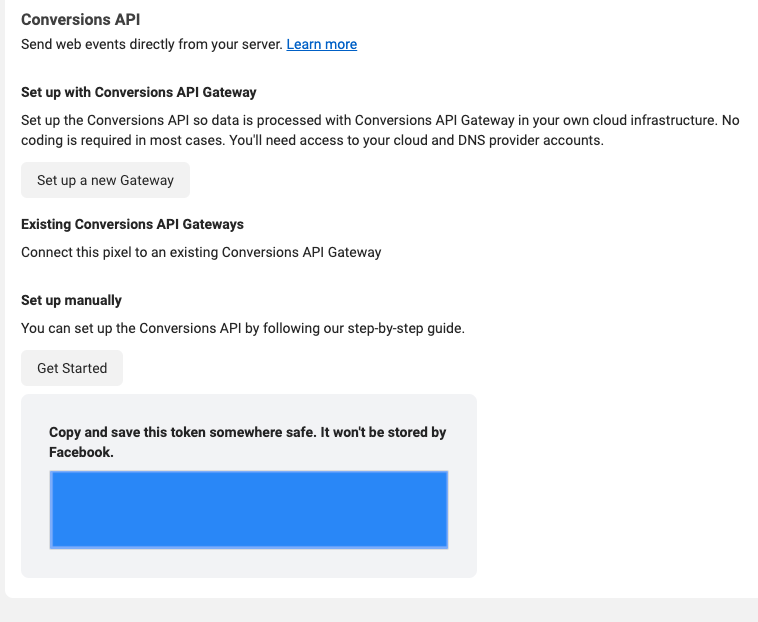
To use the Meta Conversions API, you will need an access token. Inside Events Manager, follow these steps:
- Choose the Pixel you want to implement.
- Select the Settings tab.
- Find the Conversions API section and click on the Generate access token link under Set up manually, and follow the instructions pop-up:
NOTE: The Generate access token link is only visible to users with developer privileges for the business. The link is hidden from other users.
Heads Up!
Once the token is generated, be sure to keep a copy of it as you will not be able to see it again, and will need to enter it in Step #2.
To use the Meta Conversions API, you will need an access token. Inside Events Manager, follow these steps:
- Choose the Pixel you want to implement.
- Select the Settings tab.
- Find the Conversions API section and click on the Generate access token link under Set up manually, and follow the instructions pop-up:
NOTE: The Generate access token link is only visible to users with developer privileges for the business. The link is hidden from other users.
Heads Up!
Once the token is generated, be sure to keep a copy of it as you will not be able to see it again, and will need to enter it in Step #2.
2) Add Meta App (Meta) to your MediaScalers Login
- Login to your MediaScalers Partner account.
- Navigate to Company Settings - Integrations, then click Add Business on the Meta Business Accounts card.
- Fill in the fields with the information collected in Step #1 and Step #2. Business Name can be any name you choose. Save.
- Login to your MediaScalers Partner account.
- Navigate to Company Settings - Integrations, then click Add Business on the Meta Business Accounts card.
- Fill in the fields with the information collected in Step #1 and Step #2. Business Name can be any name you choose. Save.
3) Setup Meta Pixel in MediaScalers
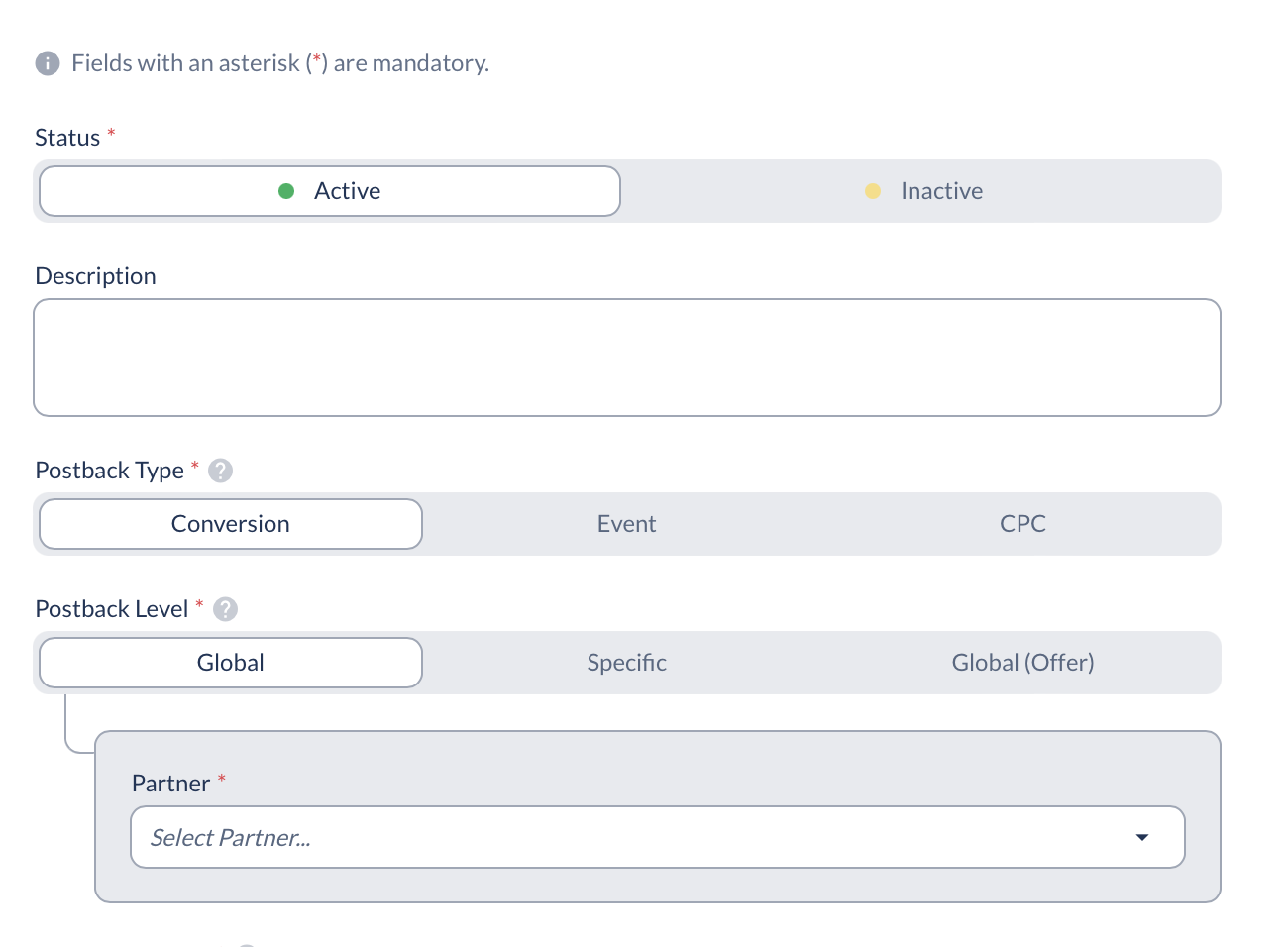
- Navigate to Postbacks and decide whether you want to edit an existing postback or add a new one.
- Under the Delivery Method, select Meta.
- Under Postback Level, select Specific and choose the matching offer.
- Under Meta Business, select the Business App created in Step #1.
- Under Meta Pixel, select the ID. To find the ID or create a new one - [Click Here]
- Under Meta Event Name, select the Event that matches the action of the Pixel.
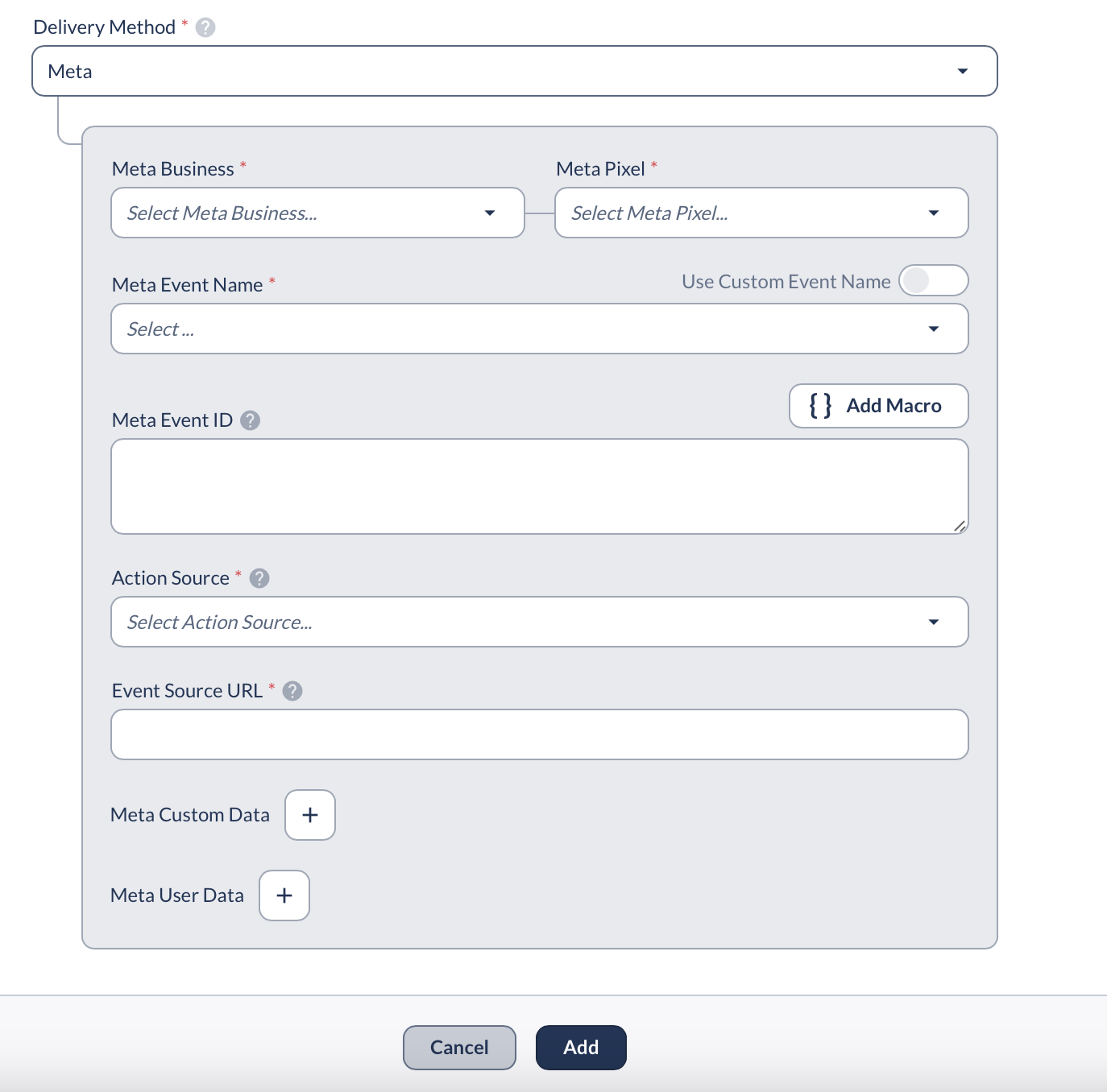
- Select Action Source. Please reference the documentation linked below to determine the value to enter here.
The action_source, as described by Meta: “This field allows you to specify where your conversions occurred. Knowing where your events took place helps ensure your ads go to the right people.” [Action Source Documentation]
- (**Optional if the Meta Event is a Purchase) Enter Meta Custom Data.
- Click the + Add button and input Currency {offer_currency}.
- Click the + Add button again and input Value {payout_amount}.
- Scroll down to Meta User Data, and click the + Add button.
- Under Data Field, select Fbc. We recommend that you enter the following as the Value: fb.1.{timestamp}.{fbclid}
- Once you have completed this setup in your Partner Portal, request the Network to complete the following in their Network Portal:
- Navigate to Partners - Postback. Click Edit on the row of the pixel. Add the Event Source URL.
- The event_source_url, as described by Meta: “The browser URL where the event happened.” [Source URL Documentation]

- Navigate to Postbacks and decide whether you want to edit an existing postback or add a new one.
- Under the Delivery Method, select Meta.
- Under Postback Level, select Specific and choose the matching offer.
- Under Meta Business, select the Business App created in Step #1.
- Under Meta Pixel, select the ID. To find the ID or create a new one - [Click Here]
- Under Meta Event Name, select the Event that matches the action of the Pixel.
- Select Action Source. Please reference the documentation linked below to determine the value to enter here.
The action_source, as described by Meta: “This field allows you to specify where your conversions occurred. Knowing where your events took place helps ensure your ads go to the right people.” [Action Source Documentation] - (**Optional if the Meta Event is a Purchase) Enter Meta Custom Data.
- Click the + Add button and input Currency {offer_currency}.
- Click the + Add button again and input Value {payout_amount}.
- Scroll down to Meta User Data, and click the + Add button.
- Under Data Field, select Fbc. We recommend that you enter the following as the Value: fb.1.{timestamp}.{fbclid}
- Once you have completed this setup in your Partner Portal, request the Network to complete the following in their Network Portal:
- Navigate to Partners - Postback. Click Edit on the row of the pixel. Add the Event Source URL.
- The event_source_url, as described by Meta: “The browser URL where the event happened.” [Source URL Documentation]
Data Hashing For Privacy Compliance
When sending personal information like emails or phone numbers to Meta, you may need to hash the data for privacy compliance. MediaScalers supports automatic hashing with these formats:
- {adv1>LC_SHA256} - Converts to lowercase first, then applies SHA256 hashing
- {adv2>LC_SHA256} - Converts to lowercase first, then applies SHA256 hashing
- {sub1>LC_MD5} - Converts to lowercase first, then applies MD5 hashing
Available hashing options: SHA1, SHA256, MD5. Use LC_ prefix (like LC_SHA256) when you need to convert data to lowercase before hashing - this is especially important for email addresses to ensure consistent hashing.
Advertisers would typically pass email data in adv1 and phone numbers in adv2, which can then be hashed and sent to partners using these macros.
When sending personal information like emails or phone numbers to Meta, you may need to hash the data for privacy compliance. MediaScalers supports automatic hashing with these formats:
- {adv1>LC_SHA256} - Converts to lowercase first, then applies SHA256 hashing
- {adv2>LC_SHA256} - Converts to lowercase first, then applies SHA256 hashing
- {sub1>LC_MD5} - Converts to lowercase first, then applies MD5 hashing
Available hashing options: SHA1, SHA256, MD5. Use LC_ prefix (like LC_SHA256) when you need to convert data to lowercase before hashing - this is especially important for email addresses to ensure consistent hashing.
Advertisers would typically pass email data in adv1 and phone numbers in adv2, which can then be hashed and sent to partners using these macros.
Troubleshooting
Viewing API response from Meta (Facebook)
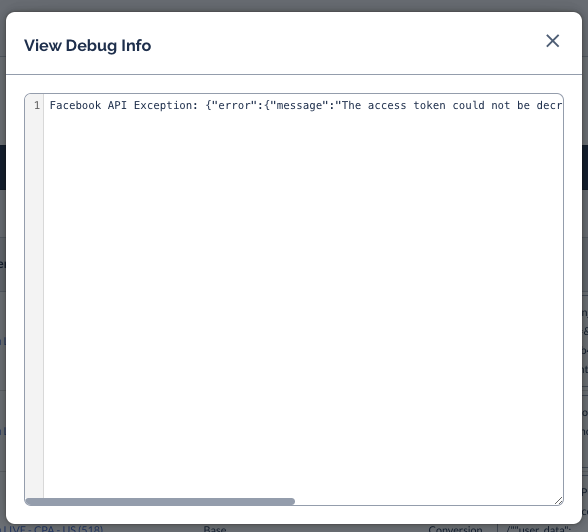
- If you navigate to Reporting > Partner Postback Report you can see the attempts that were made to the Facebook Postback that was set up.
- If you select the options on the failed attempt > View Debug Info

You will then be able to see the response from Meta (Facebook) as to why there was an error:
Required fbclid is missing from click parameters:
Meta will only receive a successful response if a fbclid is included in the click details. This can be viewed under the click details > Parameters of the click that was made:
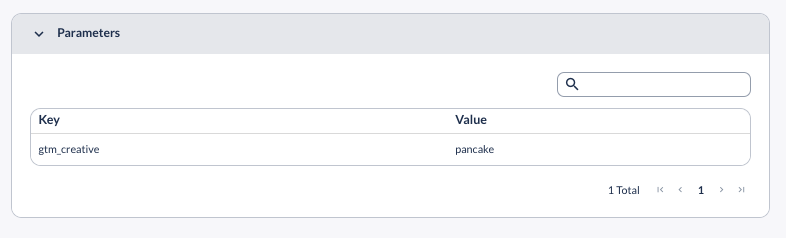
If an affiliate is using direct linking, the fbclid will automatically be passed when a user clicks on the Meta Ad. If they are using direct linking, and there is no fbclid, then the click did not originate from Meta traffic.
If the partner is using a redirect tracking link, they will need to ensure &fbclid={fbclid} is appended to their Partner Tracking Link used in the Ad Placement.
Heads Up!
Direct Linking is required by Meta and using Redirect Links will put the Meta Business Account at risk of being flagged by Meta.
FAQ
Will MediaScalers be able to pull the correct amount of conversions even if Meta's reporting is off?
Yes. MediaScalers receives conversions either from the first-party cookie or from a server call directly to our platform, with extremely high accuracy. Additionally, there are tools in place that record conversions even if the user deletes their cookies. Transparent reporting will tell you exactly how the conversion was attributed.
Will MediaScalers be able to pull the correct amount of conversions even if Meta's reporting is off?
Yes. MediaScalers receives conversions either from the first-party cookie or from a server call directly to our platform, with extremely high accuracy. Additionally, there are tools in place that record conversions even if the user deletes their cookies. Transparent reporting will tell you exactly how the conversion was attributed.